Cloud Security
Begineer Friendly

Cloud computing is the technology behind many of the applications, websites, and digital services people use every day. Instead of running everything on physical servers owned by a company, organizations can provision computing power, storage, databases, and networking resources from cloud providers on demand.
This approach has changed how IT infrastructure is designed, deployed, and managed. Whether you are exploring cloud careers, preparing for a certification, or learning modern infrastructure, understanding the basics of cloud computing gives you a foundation for technologies such as virtualization, containers, cloud networking, and automation.
What Exactly Is Cloud Computing
Cloud computing means accessing computing resources, storage, and applications over the internet instead of maintaining them locally. Rather than owning and operating physical servers in your office or data center, you leverage infrastructure managed by a cloud provider like Amazon Web Services (AWS), Microsoft Azure, or Google Cloud.
The fundamental shift is simple but powerful: you move from a capital-intensive model where you purchase expensive hardware upfront to an operational model where you pay for what you actually use. A company might rent computing power, storage capacity, and databases from a cloud provider on a per-hour or per-gigabyte basis, scaling up when demand increases and scaling down when it decreases.
This accessibility over the internet, combined with on-demand provisioning and pay-per-use pricing, defines what cloud computing is at its core. But understanding how these resources actually work requires looking at the technical architecture underneath.
How Cloud Computing Works
Cloud computing depends on large data centers containing physical servers, storage systems, networking equipment, and other infrastructure. Cloud providers combine these resources into pools that can be allocated to customers through software.
Virtualization plays an important role. A physical server can be divided into multiple virtual machines, allowing different workloads to run independently on the same underlying hardware.
When a user requests a cloud resource, the provider's management systems can allocate computing capacity, storage, networking, and other services based on the requested configuration.
A simplified process looks like this:
A user or application requests a cloud resource.
The cloud platform identifies available infrastructure.
Computing, storage, and networking resources are allocated.
The workload runs within the provider's infrastructure.
Resources can be increased, reduced, or released as requirements change.
This on-demand model is one reason cloud infrastructure can support applications with constantly changing workloads.
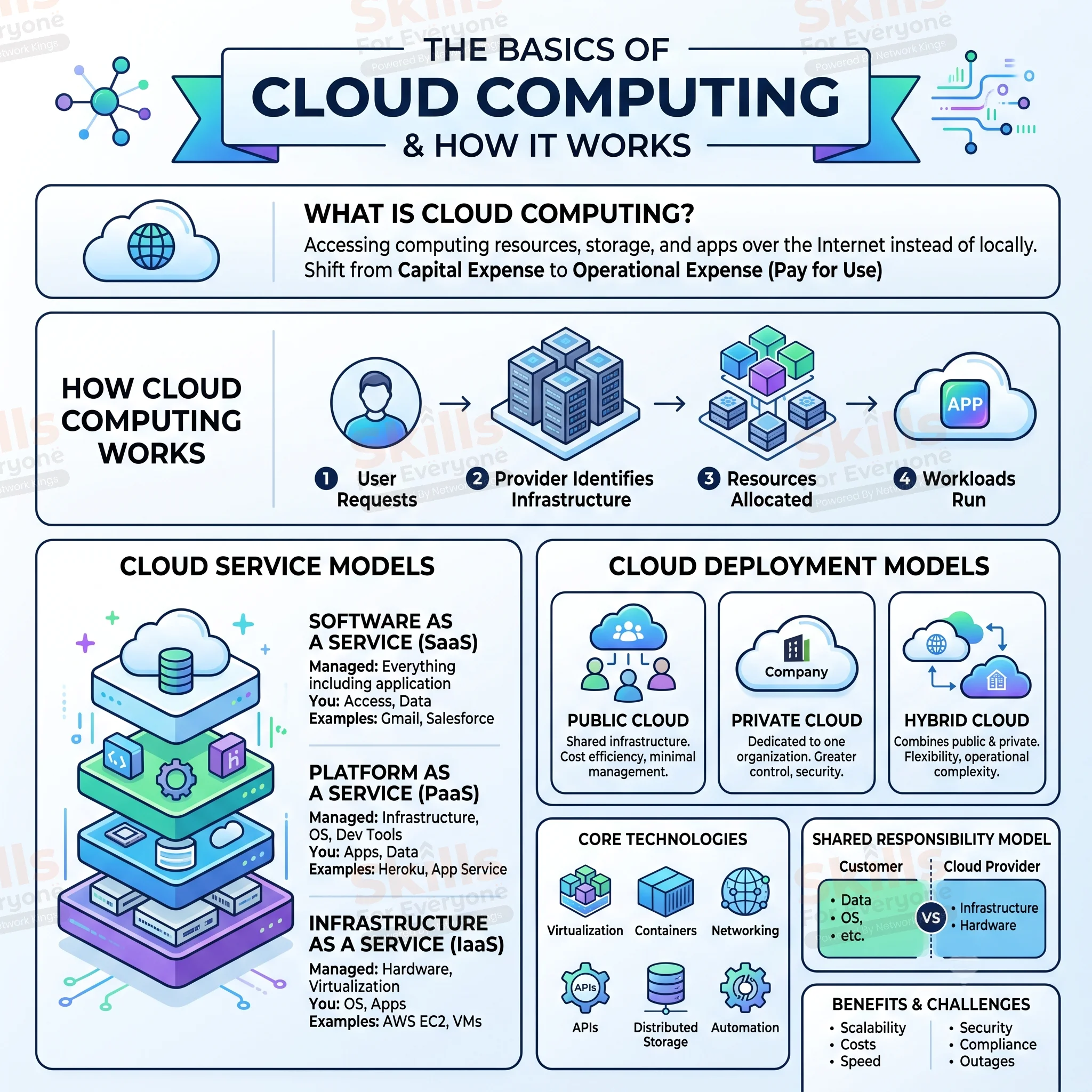
Understanding Cloud Computing Service Models
Cloud computing offerings fall into distinct service models based on what the cloud provider manages versus what you manage. The differences are significant and affect your responsibility, cost, and complexity.
Service Model | What the Provider Manages | Your Responsibility | Common Examples |
Infrastructure as a Service (IaaS) | Physical hardware, virtualization, storage, networking | Operating systems, applications, middleware, data | AWS EC2, Azure VMs, Google Compute Engine |
Platform as a Service (PaaS) | Infrastructure, operating systems, development tools | Applications, data | Heroku, Google App Engine, Azure App Service |
Software as a Service (SaaS) | Everything including the application | User accounts, data input | Salesforce, Microsoft 365, Slack |
Infrastructure as a Service (IaaS) gives you virtual servers and storage that you control. You install your own operating system, configure software, manage patches, and maintain applications. IaaS is flexible but requires more hands-on management. Cloud engineers and systems administrators work primarily with IaaS.
Platform as a Service (PaaS) abstracts away infrastructure complexity. You write code and deploy applications without worrying about servers or storage provisioning. The platform handles scaling, backups, and updates automatically. Developers often prefer PaaS because it lets them focus on writing applications rather than infrastructure.
Software as a Service (SaaS) is what most people use daily without thinking about cloud computing at all. Gmail, Microsoft 365, Slack, and Salesforce are SaaS applications. You simply log in and use the software. The vendor manages everything from infrastructure to security to feature updates.
Cloud Deployment Models
Cloud computing infrastructure can be deployed in different configurations depending on your requirements, security concerns, and regulatory obligations.
Public cloud means the infrastructure is owned and operated by the cloud provider and shared among multiple customers. AWS, Azure, and Google Cloud are public clouds. Public cloud offers cost efficiency and minimal management overhead but less control over underlying infrastructure.
Private cloud means the infrastructure is dedicated to a single organization, either managed internally or by a third-party provider. Private clouds offer greater control and security but require higher investment and ongoing management. Large enterprises with strict compliance requirements often operate private clouds.
Hybrid cloud combines public and private cloud resources. An organization might run sensitive workloads in a private cloud while using public cloud for development, testing, or variable-demand applications. Hybrid cloud provides flexibility but introduces operational complexity.
Core Technologies Behind Cloud Computing
Several technologies work together to make modern cloud infrastructure possible.
Virtualization allows physical computing resources to be divided into isolated virtual machines.
Containers package applications and their dependencies so they can run consistently across environments.
Cloud networking connects workloads, users, applications, and services through virtual networks and routing mechanisms.
Distributed storage allows data to be stored across multiple systems rather than depending on a single physical device.
APIs allow applications and automation tools to interact with cloud services programmatically.
Automation enables infrastructure and workloads to be deployed, configured, and scaled with minimal manual intervention.
Cloud platforms also use control and data planes. The control plane handles configuration and management operations, while the data plane handles the actual processing of application traffic and workloads.
Cloud Security and Shared Responsibility
Cloud security is an essential part of cloud architecture. Providers secure the underlying physical infrastructure and many managed platform components, while customers remain responsible for securing the resources and configurations they control.
Important cloud security practices include:
Identity and access management
Least-privilege permissions
Encryption
Network segmentation
Security monitoring and logging
Secure application configuration
Regular vulnerability management
The exact division of responsibility varies depending on the service being used. Understanding this shared responsibility model is essential when designing secure cloud environments.
Benefits and Challenges of Cloud Computing
One of the biggest advantages of cloud computing is scalability. An organization can increase computing resources as demand grows and reduce them when demand falls.
Cloud platforms can also provide:
Faster infrastructure provisioning
Flexible resource allocation
Access to managed services
Global deployment options
Automated backups and recovery capabilities
Support for variable workloads
Reduced need for maintaining physical infrastructure
However, cloud adoption also introduces challenges. Security remains a shared responsibility between the provider and customer, and organizations must configure identity, access controls, networks, applications, and data appropriately.
Other concerns include compliance requirements, vendor lock-in, unexpected cloud costs, service outages, data privacy, and the complexity of managing distributed environments.
Cloud computing is therefore not simply about moving everything to someone else's servers. Effective cloud adoption requires careful architecture, security, monitoring, and cost management.
Real-World Applications of Cloud Computing
Cloud computing supports websites, mobile applications, streaming platforms, e-commerce systems, banking applications, artificial intelligence workloads, and enterprise software.
Consider a typical web application. A load balancer can distribute requests across application servers or containers. A managed database can store application data, object storage can hold files, and monitoring services can track performance and system health.
Businesses also use cloud platforms for backups, disaster recovery, data analytics, machine learning, software development, and large-scale data processing.
Why Cloud Computing Matters for Your Career
Cloud computing knowledge is useful across many technology roles. Cloud engineers and architects design infrastructure, while DevOps engineers work with deployment automation, containers, infrastructure as code, and cloud services.
Networking professionals need to understand virtual networks, routing, connectivity, and load balancing. Security professionals work with identity, access control, encryption, monitoring, and cloud security architecture.
Developers also benefit from understanding cloud databases, storage, APIs, containers, serverless platforms, and managed services.
A strong foundation in networking, operating systems, virtualization, storage, and security can make it easier to understand more advanced cloud technologies.
Moving Forward with Cloud Computing
Cloud computing represents a fundamental shift in how computing infrastructure is provisioned, managed, and paid for. Understanding these basics, the service models, deployment options, and core technologies gives you a solid foundation for deeper learning.
The technology continues evolving. Kubernetes has become the standard for container orchestration. Serverless computing abstracts away more infrastructure concerns. Edge computing brings computing closer to users for reduced latency. But the fundamental concepts covered here remain constant. Once you grasp how virtualization, service models, and cloud deployment work, you're prepared to learn specific technologies, pursue certifications like AWS Solutions Architect or Azure Administrator, and build a career in cloud computing.
(FAQs)
1. What are the core components of cloud computing?
The core components include compute, storage, networking, databases, virtualization, security, and management tools. These components work together to deliver scalable cloud infrastructure.
2. How does virtualization support cloud computing?
Virtualization abstracts physical hardware into virtual machines, allowing multiple workloads to share the same physical resources while remaining logically isolated.
3. What is the difference between scalability and elasticity in cloud computing?
Scalability is the ability to increase or decrease resources to meet workload requirements. Elasticity focuses on automatically adjusting resources in response to changing demand.
4. How does cloud networking work?
Cloud networking uses virtual networks, subnets, routing, load balancers, firewalls, and security controls to connect cloud workloads and manage traffic.
5. What is the difference between IaaS, PaaS, and SaaS?
IaaS provides virtual infrastructure, PaaS provides managed application platforms, and SaaS delivers complete software applications over the internet.
6. How is cloud security managed?
Cloud security uses identity and access management, encryption, network controls, monitoring, logging, and security policies. Responsibility is generally shared between the provider and customer.
7. What role do containers play in cloud computing?
Containers package applications with their dependencies, making workloads portable and easier to deploy, scale, and manage across cloud environments.
8. How do AWS, Azure, and Google Cloud differ?
AWS, Microsoft Azure, and Google Cloud provide similar foundational services but differ in service offerings, architecture, pricing models, tooling, and integration with their respective ecosystems.