Networking
Begineer Friendly
Every device that connects to a network needs an address. IP addressing and subnetting form the foundation of that system, deciding how computers, phones, servers, and routers find each other across a room or across the world. Without it, the internet simply could not function.
Subnetting matters because raw IP addressing alone would waste space and create chaos on large networks. It lets engineers divide one big network into smaller, organized pieces. In this guide you will learn what an IP address actually is, the different types you will encounter, how subnetting works, how to read CIDR notation, and how to calculate a subnet by hand.
What Is an IP Address
An IP address is a unique numerical identifier assigned to every device connected to a network. It allows devices to locate and communicate with each other using the TCP/IP protocol.
Imagine sending a letter through the postal service. Without a destination address, the letter would never reach the intended recipient. An IP address works the same way for computers, smartphones, printers, servers, and other network devices.
An IP address helps:
Identify each device on a network
Route data to the correct destination
Enable communication across local and global networks
Support internet access and internal business applications
Without IP addresses, modern networking simply would not function.
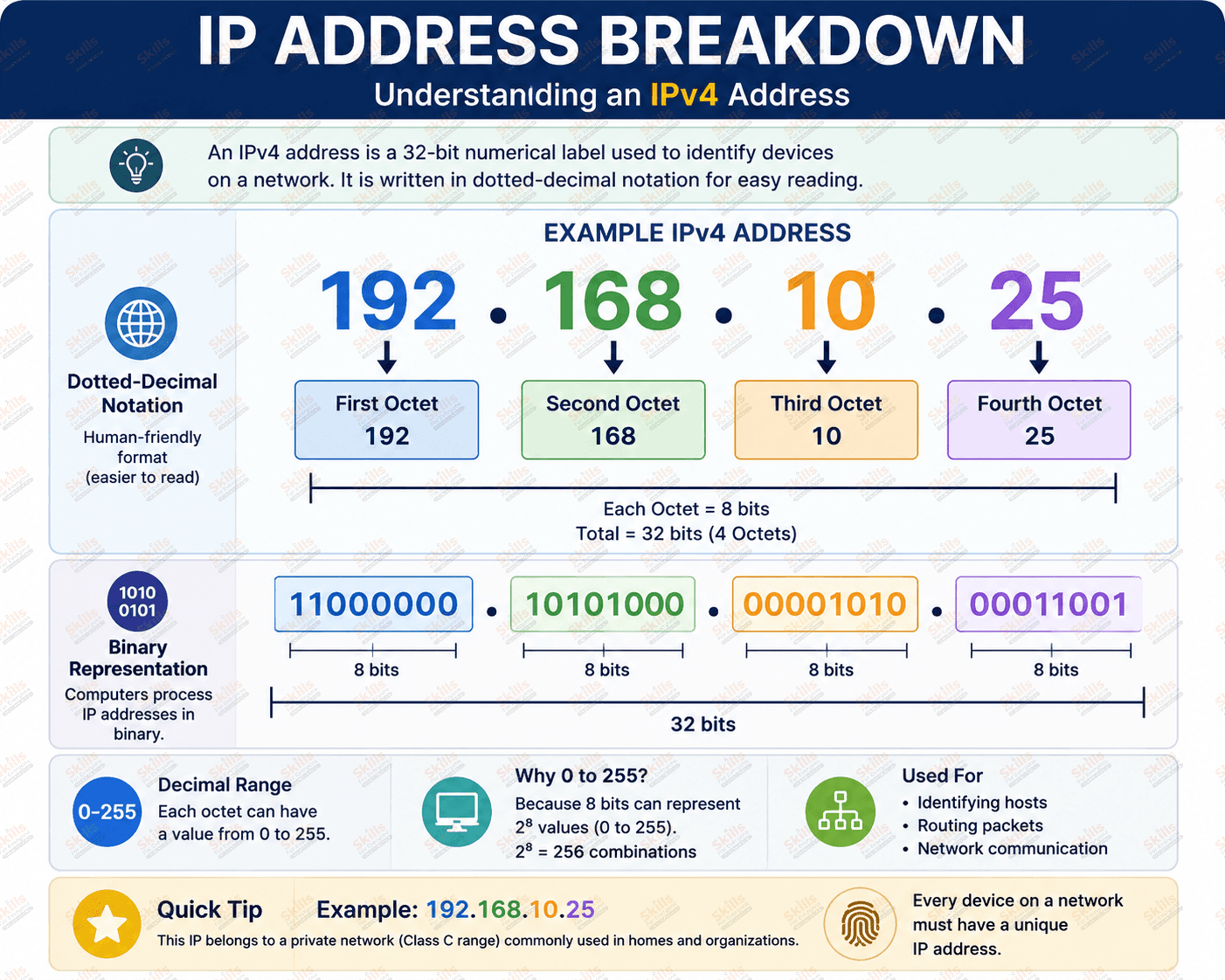
IP Address Breakdown Diagram
An IPv4 address consists of 32 bits, divided into four 8-bit sections called octets. Each octet ranges from 0 to 255, making the address easy for humans to read while computers process it in binary.
Types of IP Addresses
Different networking environments use different types of IP addresses.
IPv4 Address
IPv4 uses a 32-bit addressing scheme written in dotted decimal format.
Example:
192.168.10.25
Although IPv4 remains the most widely deployed protocol, its address space is limited to approximately 4.3 billion addresses.
IPv6 Address
IPv6 uses 128-bit hexadecimal addresses.
Example:
2001:db8:85a3::8a2e:370:7334
IPv6 provides an enormous address pool that supports the growing number of internet-connected devices worldwide.
Public IP Address
A public IP address is assigned by an Internet Service Provider and is accessible from the internet.
Private IP Address
Private IP addresses are used inside organizations and homes. They cannot be accessed directly from the internet.
Common private ranges include:
10.0.0.0/8
172.16.0.0/12
192.168.0.0/16
Static IP Address
A static IP remains fixed and is commonly assigned to servers, routers, and network infrastructure.
Dynamic IP Address
Dynamic IP addresses are assigned automatically by DHCP servers and may change over time.
Loopback Address
The loopback address, 127.0.0.1, allows a device to communicate with itself for testing and troubleshooting.
APIPA
Automatic Private IP Addressing assigns addresses from 169.254.0.0/16 when a DHCP server is unavailable.
Understanding Subnetting
Subnetting divides a large network into smaller logical networks, making communication more efficient and improving network management.
Instead of placing every device into one massive network, administrators create smaller segments based on departments, buildings, or business functions.
Benefits of subnetting include:
Better network performance
Reduced broadcast traffic
Improved security
Easier troubleshooting
Efficient IP address allocation
Better scalability for enterprise environments
For example, a company might place its finance department on one subnet and its guest Wi-Fi on another. If the guest network gets compromised, the finance subnet stays protected. In enterprise networks, subnetting also allows better bandwidth allocation and simplifies routing between departments or buildings.
Why Subnetting Matters for Certification Exams
CCNA and CCNP exams test subnetting heavily because it reflects real job skills. Engineers who cannot subnet quickly cannot design or troubleshoot networks efficiently.
IP Classes Explained
Although Classless Inter-Domain Routing (CIDR) has largely replaced classful networking, understanding IP classes remains useful for networking fundamentals.
Class | Address Range | Default Subnet Mask | Maximum Hosts | Typical Usage |
A | 1.0.0.0 to 126.255.255.255 | 255.0.0.0 | 16,777,214 | Large organizations |
B | 128.0.0.0 to 191.255.255.255 | 255.255.0.0 | 65,534 | Medium networks |
C | 192.0.0.0 to 223.255.255.255 | 255.255.255.0 | 254 | Small networks |
D | 224.0.0.0 to 239.255.255.255 | Not applicable | Not applicable | Multicast |
E | 240.0.0.0 to 255.255.255.255 | Not applicable | Not applicable | Experimental |
IPv4 vs IPv6
Feature | IPv4 | IPv6 |
Address Length | 32 bit | 128 bit |
Format | Decimal, dotted | Hexadecimal, colon separated |
Number of Addresses | About 4.3 billion | Virtually unlimited |
Security | Optional IPsec | IPsec built in |
Performance | NAT can add overhead | Simplified header improves routing |
Use Cases | Legacy networks, home routers | Cloud, mobile, IoT growth |
Binary and Decimal Basics
IP addresses are really binary numbers translated into decimal for humans. Each octet in an IPv4 address represents 8 bits, with values from 0 to 255.
For example, the decimal number 192 converts to binary as 11000000. Add the values of each activated bit position, 128 plus 64, and you get 192. Understanding this conversion is essential for subnet math.
Understanding CIDR Notation
CIDR, or Classless Inter Domain Routing, replaced the old class system with a flexible slash notation showing how many bits belong to the network portion.
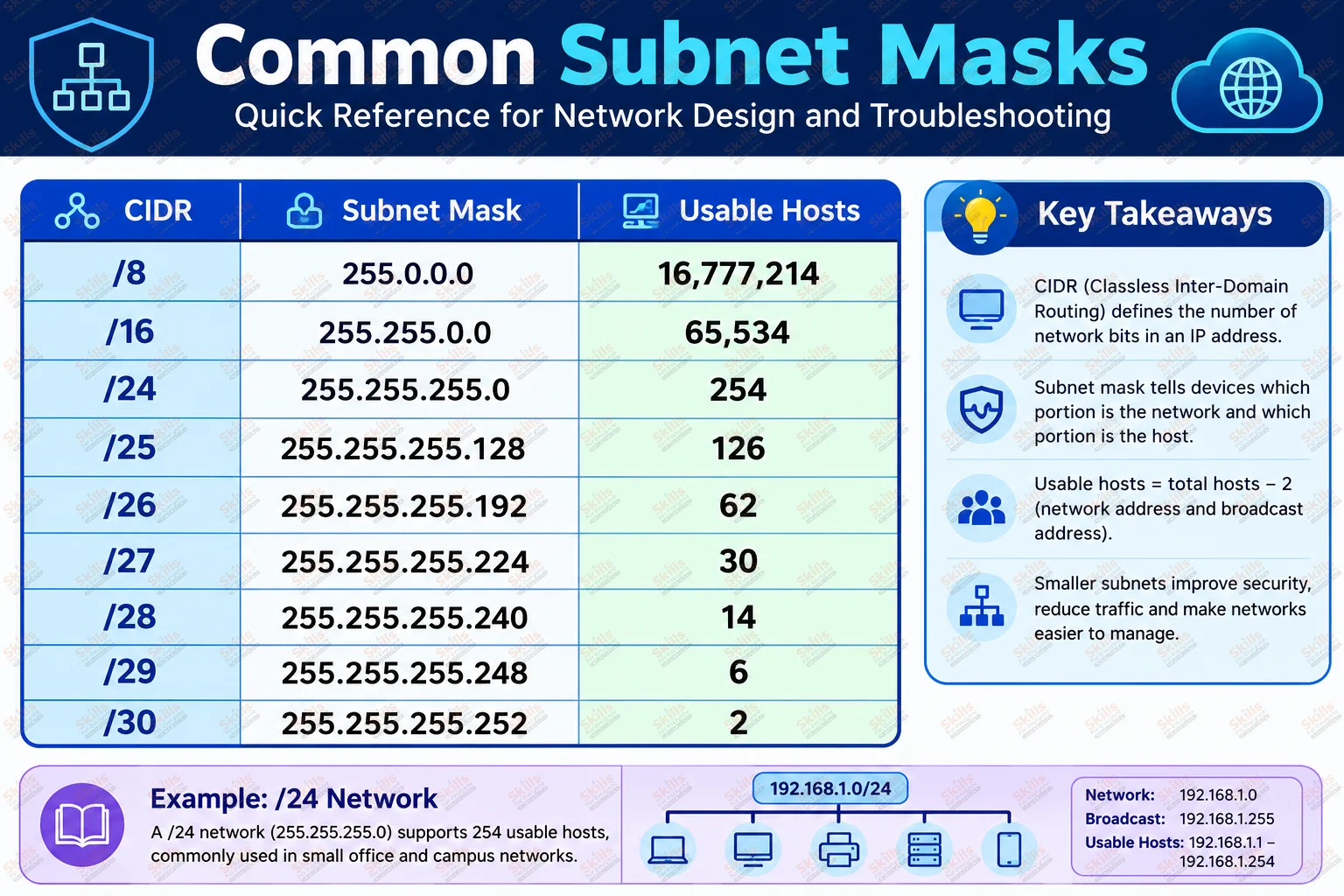
A /24 means 24 network bits, leaving 8 host bits, common in small offices. A /16 gives far more hosts, suited to larger networks. A /30 provides only 2 usable hosts, ideal for point to point links between routers. A /32 identifies a single specific host.
CIDR reduces wasted addresses and simplifies routing tables, which is why every modern network design relies on it.
How to Calculate a Subnet
Consider the network 192.168.10.0/26.
The subnet mask is 255.255.255.192.
The network address is 192.168.10.0.
The first usable host is 192.168.10.1.
The last usable host is 192.168.10.62.
The broadcast address is 192.168.10.63.
The number of usable hosts is 62.
Common Subnet Masks
Common Beginner Mistakes
Many new students choose the wrong subnet mask for the number of hosts they actually need, wasting address space. Others confuse public and private IPs, assuming a private address can be reached directly from the internet.
Ignoring the broadcast address is another frequent error, since it cannot be assigned to a device. Finally, mixing IPv4 and IPv6 rules together, such as applying subnet mask logic to IPv6 prefixes, leads to confusion during real configuration work.
Best Practices
Always document your IP addressing scheme before deploying a network. Reserve room for growth by choosing subnet sizes slightly larger than your current need. Separate sensitive systems onto their own subnets, and standardize naming conventions so engineers can identify a subnet's purpose instantly.
Conclusion
IP addressing and subnetting are core skills for anyone working in networking, from IT beginners to experienced CCNP engineers. Once you understand how addresses are structured, how subnet masks divide networks, and how CIDR notation simplifies design, the rest of networking becomes much easier to grasp.
Keep practicing subnet calculations by hand until they feel automatic, since this single skill separates confident network professionals from everyone else.
FAQs
What is subnetting?
Subnetting is the process of dividing a large network into smaller, more manageable subnetworks.
Why do we use subnet masks?
A subnet mask tells devices which portion of an IP address represents the network and which represents the host.
What is CIDR?
CIDR is a method of allocating IP addresses using a slash notation instead of fixed address classes.
How many hosts are in a /24 network?
A /24 network provides 254 usable host addresses.
What is the difference between IPv4 and IPv6?
IPv4 uses 32 bit addresses with limited space, while IPv6 uses 128 bit addresses offering a vastly larger pool.
What is a private IP address?
A private IP address is used inside a local network and cannot be accessed directly from the internet.