Cloud Security
Begineer Friendly
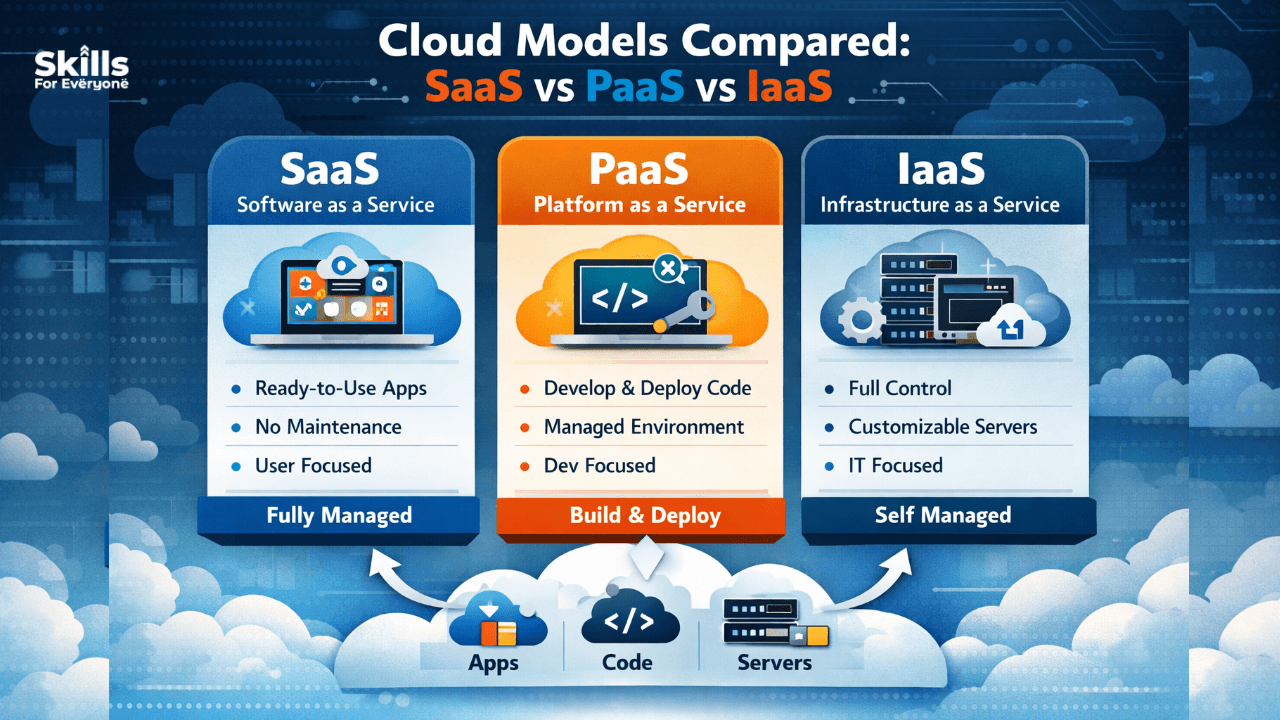
Businesses waste thousands of dollars every year on the wrong cloud model — not because they chose a bad vendor, but because they chose the wrong type of service. Whether you're a startup scaling fast, a developer building the next big app, or an IT manager modernizing legacy infrastructure, understanding the three core cloud service models — SaaS, PaaS, and IaaS — can save you time, money, and serious headaches.
Cloud computing has fundamentally changed how organizations build and deliver technology. But "moving to the cloud" is not a single decision — it's a spectrum. The model you choose determines how much control you have, how much you pay, and how fast your team can move.
In this guide, we'll break down each model clearly, compare them side by side, and help you figure out which one (or combination) is right for your situation.
What Is SaaS? Software as a Service
SaaS is the model most people interact with every single day without realizing it. It delivers complete, ready-to-use software applications over the internet. You don't install anything, manage any servers, or worry about updates — the provider handles absolutely everything.
How it works: You subscribe to the software, log in through a browser or app, and start working. The vendor manages the application, the data storage, the security patches, the uptime — all of it.
Real-world examples: Gmail, Slack, Salesforce, Zoom, Dropbox, Microsoft 365.
Best for:
Teams that need productivity tools without IT overhead
Small and medium businesses that lack in-house engineers
Anyone who needs a proven, off-the-shelf solution fast
The trade-off: You sacrifice customization for convenience. You're using their software on their terms. Deep customization isn't usually possible, and your data lives on their infrastructure.
What Is PaaS? Platform as a Service
PaaS sits in the middle of the cloud spectrum. It gives developers a ready-made environment to build, test, and deploy their own applications — without managing the underlying infrastructure.
Think of it this way: with IaaS you rent a plot of land and build from scratch. With SaaS someone hands you a finished house. PaaS gives you the plot with the foundation, plumbing, and wiring already done — you just build the rooms.
How it works: The provider manages the operating system, runtime environments, middleware, servers, and networking. You focus exclusively on writing and deploying code.
Real-world examples: Heroku, Google App Engine, Microsoft Azure App Service, AWS Elastic Beanstalk.
Best for:
Development teams that want to ship faster without DevOps overhead
Startups building custom web apps or APIs
Businesses that need to scale applications without hiring infrastructure engineers
The trade-off: You're still somewhat locked into the provider's environment and tool stack. Migrating between PaaS platforms can be complex.
What Is IaaS? Infrastructure as a Service
IaaS is the most flexible and powerful cloud model — and the most demanding to manage. It provides virtualized computing resources over the internet: servers, storage, networking, and data centers, all on demand.
You rent the raw infrastructure and then install whatever operating system, software, and configuration you want on top of it. It's like having your own data center, but you never have to buy a single physical server.
How it works: The provider manages the physical hardware, virtualization layer, and core networking. Everything from the OS upward is your responsibility.
Real-world examples: Amazon Web Services (EC2), Microsoft Azure Virtual Machines, Google Compute Engine, DigitalOcean.
Best for:
Enterprises with complex, custom infrastructure needs
Companies migrating large legacy systems to the cloud
Businesses that need full control over their environment for compliance or security reasons
The trade-off: With great power comes great responsibility. Your team needs solid DevOps and sysadmin expertise. You're responsible for patching, securing, and maintaining the OS and everything above it.
SaaS vs PaaS vs IaaS: A Quick Comparison
SaaS | PaaS | IaaS | |
You manage | Nothing | App + Data | App + Data + OS + Middleware |
Provider manages | Everything | Infrastructure + OS | Hardware + Virtualisation |
Control level | Low | Medium | High |
Setup time | Minutes | Hours/Days | Days/Weeks |
Cost model | Per user/month | Per resource/usage | Per resource/usage |
Who it's for | End users, businesses | Developers | DevOps, IT teams |
How to Choose the Right Cloud Model
Here's a practical decision framework:
Choose SaaS if:
You need a tool that works out of the box
You don't have developers or IT staff to manage infrastructure
Speed of deployment is more important than customization
Choose PaaS if:
You're building a custom application and want to focus on code, not servers
You want built-in scalability without managing infrastructure complexity
Your team is developer-heavy but light on DevOps
Choose IaaS if:
You need full control over your environment
You have compliance or regulatory requirements that demand specific configurations
You're migrating complex, existing on-premises workloads to the cloud
In practice, many organizations use all three. A business might use Salesforce (SaaS) for CRM, Heroku (PaaS) for a customer-facing web app, and AWS EC2 (IaaS) for backend data processing — each model serving a different need.
Common Mistakes to Avoid
Defaulting to IaaS because it feels more "serious" — most startups don't need that level of control and end up paying for complexity they can't manage.
Underestimating SaaS vendor lock-in — migrating off a deeply embedded SaaS tool is harder than it looks.
Ignoring total cost of ownership — IaaS looks cheap per hour but factor in the engineering time to manage it.
Skipping the security shared responsibility model — each cloud model has a different split of security responsibilities between you and your provider. Know your obligations before you go live.
Conclusion: The Right Cloud Model Is the One That Fits Your Team
SaaS, PaaS, and IaaS aren't competing products — they're tools for different jobs. The fastest-moving companies don't pick one and commit forever. They understand the trade-offs, match the model to the problem, and evolve their strategy as they grow.
Start by asking: What do I actually need to control? Everything you don't need to manage yourself is overhead you don't have to carry. The cloud's greatest promise isn't raw computing power — it's the freedom to focus on what your business is uniquely built to do.
FAQs
1. What is the biggest difference between SaaS, PaaS, and IaaS?
The main difference lies in control and responsibility. SaaS offers ready-to-use software with zero management, PaaS provides a development platform, and IaaS gives full control over infrastructure, including servers and operating systems.
2. Which cloud model is best for startups and small businesses?
SaaS is usually the best choice for startups because it requires no infrastructure management, offers quick deployment, and reduces upfront costs, allowing teams to focus on business growth.
3. When should developers choose PaaS over IaaS?
Developers should choose PaaS when they want to focus on coding and application deployment without worrying about server management, scaling, or operating system maintenance.
4. Is IaaS more secure than SaaS or PaaS?
Not necessarily. IaaS provides more control, but security responsibility shifts to the user. SaaS and PaaS providers handle more security tasks, while IaaS requires strong in-house security expertise.
5. Can a business use SaaS, PaaS, and IaaS together?
Yes, many organizations use a hybrid approach, combining all three models—for example, SaaS for productivity tools, PaaS for app development, and IaaS for backend infrastructure.
6. What are the hidden costs of choosing the wrong cloud model?
Choosing the wrong model can lead to higher operational costs, unnecessary complexity, and wasted resources, especially when businesses overinvest in infrastructure they don’t fully utilize.
7. How do I decide which cloud model fits my business needs?
Start by evaluating your technical expertise, budget, scalability needs, and required level of control. If you need simplicity, go with SaaS; for development flexibility, choose PaaS; and for full control, opt for IaaS.